
E
EmmaSaturday, 4:40 PM · Park
Park league final. Jack says they won. Nobody kept score.
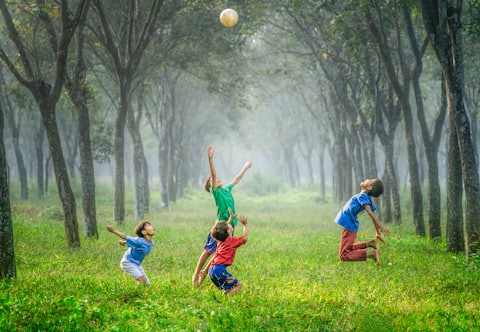
94
TTom Who kicked it into the trees?
JJack not me
A Space for your Entire Family!
Rage-bait. Algorithms. Strangers. Politics. Infinite scroll. Follower counts. Public profiles.
myFamilySpace is a private social network for the people you'd actually invite to dinner, with your family's calendar, lists and chores built in, and a way to link the other households you love. Nobody else gets in.
Email support@myfamilyspace.app with the subject “Beta invite” and we’ll reply with how to install it.
Tonight's feed
No. 01Take the tour
This is the Millers' phone. Tap the tabs, or pick a screen from the list. Six screens, one family, and nobody else.
3 new moments today
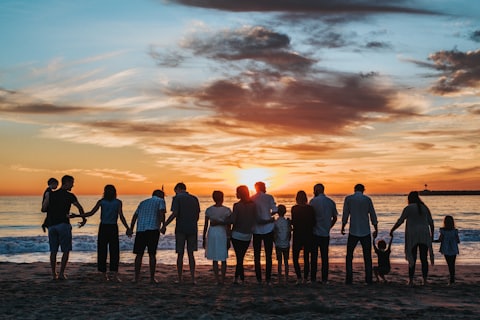
Everyone, one sunset. Pop counted twice to make sure.
Tom finished a shopping run
Groceries · 14 items · 20 min ago
DoneJack completed Feed the dog
Chores · 9-day streak · 1 hr ago
DonePark league final. Jack says they won. Nobody kept score.
Sarah added 12 photos
Road trip · 2 days ago
ViewMessages
Tuesday, September 29



Planning
Household
People
Memories
Home · the feed
Home is where your people's posts land, newest first: photos, reactions and comments from the Millers, plus what Nana & Pop's shared into your Beach Week Space. When you've seen it all, it says so.
Chat
The whole family in one thread, a few of you in another, one-on-one with Nana. Only people you're already connected to can message you, and a voice or video call is one tap from the top of any direct message.
GPS · optional
Location is off until your family turns it on, and each person can pause their own sharing any time. When you use it, you get arrival alerts, a live family map and trip reports for the new driver. It's visible to your family, and nobody else.
Calendar
Every event carries the color of the person it's for, so the week reads at a glance. Snap a photo of a flyer and AI adds the events. Up Next shows what's coming and who's driving.
Photos
Every photo from the feed, in albums anyone in the family can add to. Share an album into a Space and Nana & Pop's see it too, without anyone forwarding a thing.
Apps · the organizer
Tasks and bookmarks, groceries you check off together, chores and allowances, lists, recipes and medicine reminders, plus polls, contacts, birthdays, movie and TV recs and a wallet. One private app instead of a dozen that don't know each other.
No. 02Why you left
Most of us left for more than one reason, and none of them were about the people we loved. Here's what's different about each one.
You said: Too much fighting
Every comment comes from someone in your family or a Space you chose to join. No strangers in the replies, no pile-ons, no quote-posts, nothing built to go viral.
You said: Politics everywhere
No trending tab, no news module, no suggested posts, no pages to follow. Your feed holds what your people posted, in the order they posted it. That's all it will ever hold.
You said: Posting felt like performing
No follower counts, no public profiles, nothing to grow. You post the blurry photo because Nana wants to see it, and the only people who see it are the ones you invited.
You said: Doomscrolling
Chronological, family-only, and finite. When you've seen what your people shared, it says so, and you can put the phone down.
You said: Strangers in my feed
Families are invite-only and never discoverable. No search that turns up your family, no public profiles, no follower counts, no "people you may know." The only people who can message or call you are people you're already connected to.
You said: My personal life being public
Families are invite-only and never discoverable, so nothing you post is ever public. Your family's posts, photos and location are never sold. Location sharing stays off until you turn it on, and you can pause it whenever you like.
No. 03What's left
One app that does three things nothing else does together: a private social feed, the family's week, and a bridge between every household you belong to.
Share
Photos, posts, albums, reactions and comments, plus family chat and one-to-one voice and video calls. It's in the order things happened, it's only your family, and when you've seen it all, it tells you.
Emma messages Nana to ask if she can call, Nana says yes, and Emma starts a one-to-one video call from their chat. Pop sits beside Nana on her phone.
Pop's right beside her, on Nana's phone
One-to-one, from the video button in your chat.
Organize
Snap a photo of the soccer flyer and the events land on the calendar. Check off groceries together while someone's at the store. Chores and allowance, lists, polls, recipes, documents, medicine reminders and birthdays, all where everyone can see them.
UP NEXT · 4:30 PM
Soccer, Field 3
Jack · Tom driving
Added from a flyer photoTom is at the store
9 of 14 in the cart. Try checking one off.
Connect
Nana & Pop's house, the cousins, a co-parent, the best friends who are basically family. Each household keeps its own private feed and calendar, and you choose what flows into a shared Space. Nana sees the first-day-of-school photos without anyone forwarding them.
Who sees this?
Visible to 6 people, and nobody else.
No. 04Kids mode
Kids mode is for family members who don't have their own phone or email, mostly kids. They join from a tablet or a shared device with a code you create, then send finished chores for your OK, add to the grocery list and message the family.
Sarah's phone
Jack's tablet · Kids mode
No. 05How it works
Step 01
Create your family and invite the people in your house by text or email. Kids without a phone join from a tablet with a QR code.
Step 02
Make a Space with Nana & Pop's, the cousins, a co-parent or your oldest friends. Each household keeps its own feed and calendar.
Step 03
Post to your family, or to a Space too. Everyone sees exactly what you meant them to, in the order it happened. Nobody else sees a thing.
No. 06In plain words
We wrote these the way we'd say them across the kitchen table. If we ever can't keep one, you'll hear it from us first.
Your photos, posts, messages and location, and anything that identifies you or your family, are not for sale. Not to anyone, at any price.
Families are invite-only and never discoverable. There's no public profile to find, and no one gets in without an invite from someone inside.
Your family, and the Spaces you chose to share with. No strangers, no suggested accounts, no follower counts.
No algorithm deciding what matters to you. The newest post is on top, and the feed has an end.
It's opt-in. It stays off until you turn it on, and you can pause it whenever you want.
The myFamilySpace team
No. 07Everything in it
None of it is a separate app, and none of it is for anyone you didn't invite.
No. 08The last one
Followers. Likes from strangers. The feed that never ends.
Join the beta, and bring the people you'd actually invite to dinner. Nobody else.
Email support@myfamilyspace.app with the subject “Beta invite” and we’ll reply with how to install it.